WhatsApp templates, created and approved without the Meta dashboard.
Build a template with a header, body and buttons, submit it for approval, and track its status from the same place you send campaigns and sequences.
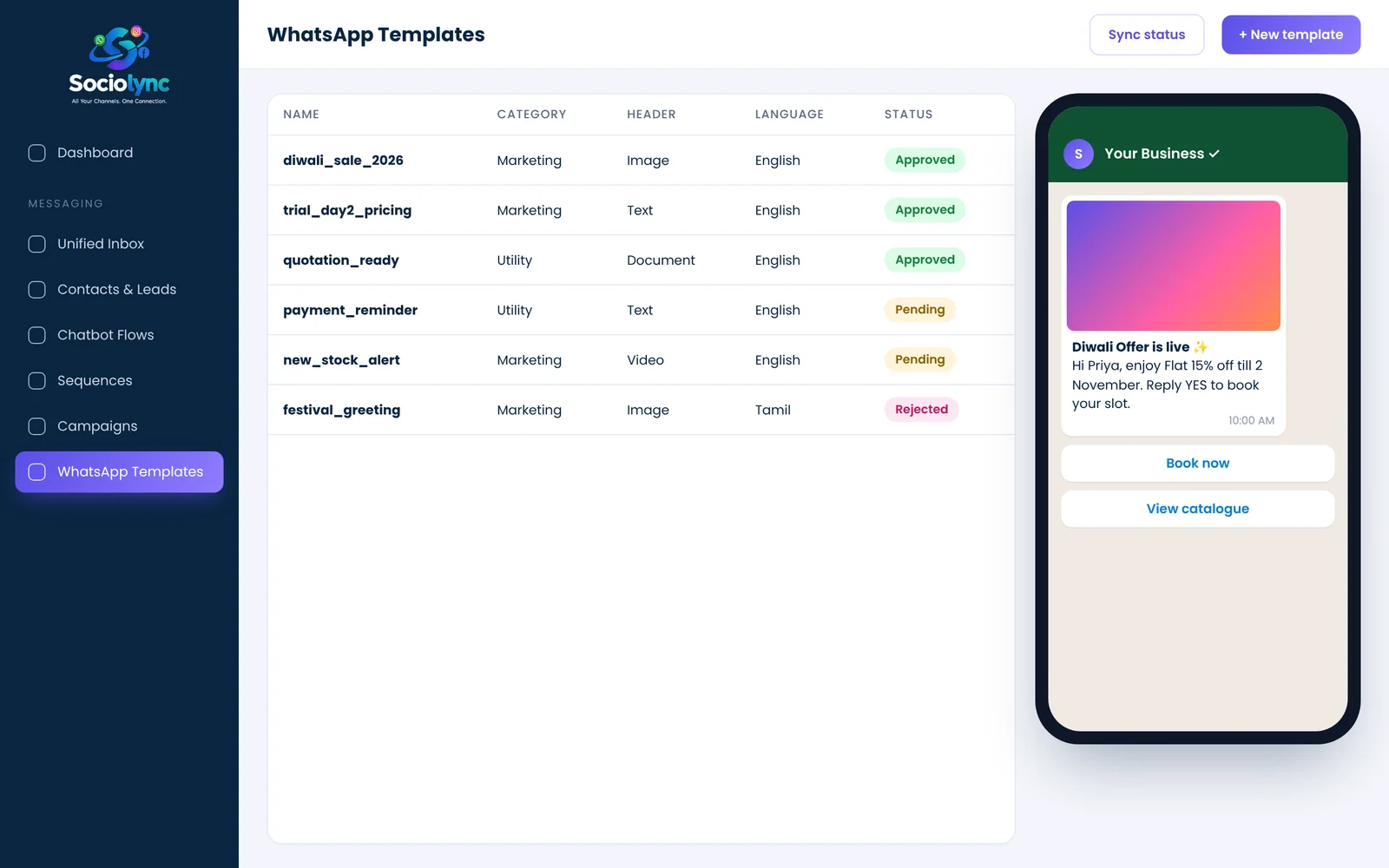
WhatsApp template messages are pre-approved message formats that let a business start a conversation or message a customer outside the 24-hour window. In Sociolync you create the template (header, body, buttons), submit it for Meta's approval and see whether it is approved, pending or rejected, then use it in campaigns and sequences.
What you get
- Image, video or document headers
- Up to 3 buttons per template
- Submit for approval from inside the platform
- Approval status synced automatically
Everything in WhatsApp Templates.
Visual builder
Header, body, footer and buttons with a live preview.
One-click submit
Send templates for approval without leaving Sociolync.
Status sync
Approved, pending or rejected, kept up to date.
Use anywhere
Templates plug straight into campaigns and sequences.
Placeholders
Personalise with variables filled at send time.
Categories
Marketing and utility templates, clearly labelled.
Up and running in three steps.
Create
Write the template and add media and buttons.
Submit
Send it for WhatsApp approval in one click.
Use
Once approved, pick it in a campaign or sequence.
Popular with
WhatsApp Templates: your questions
What is a WhatsApp template message?
A message format that WhatsApp approves in advance. Businesses need one to message a customer who hasn't written to them in the last 24 hours.
How long does WhatsApp template approval take?
Many templates are reviewed quickly, but it can take longer. Sociolync shows the current status so you know when it's ready to use.
Can templates include images and buttons?
Yes. Add an image, video or document header and up to three buttons.
Why was my template rejected?
Common reasons include formatting problems, unclear placeholders or content that doesn't fit the chosen category. Edit it and submit again.
Do I need my own Meta Business Manager to create templates?
No. Templates are created and submitted from inside Sociolync.
Bring every conversation into one place
Start free for 14 days. No card needed, and no Meta account to set up first.